-
My header image

This is my header image on mu free blogger template blogs.
Use this as a header for mpersonal erbsite nd blog. i love this thing.
header lain lagi
more


-
Increase Blog Followers
How to increase your blog followers?
Look at this blog follower. Today (April 1, 2009) my blog followers is 1(one). And by this tutorial we will see how this will work. Today i will post about the result of this tutorial. Hope you are help and enjoy.
Update April 1, 2009- Leaving comments at famous blog and join their blog as the follower.
- Using beautiful girls as primary photo. (Evil trick he he he...) Hope they not understand with my article here ;p
- Using Female gender. (i think female is more interesting to click)
more
-
Insert Yahoo Messenger Status Icon In To Blog
Here we will talk about yahoo messengers. Because for many years many people still use them daily even always.
Yahoo messenger status allow you to display your online status in your website. So your friends will know your online status even they are not sign in into their yahoo account.
And the question is:
How to put yahoo status icon in to my blog?
It so easy. Just copy and paste the script below in to your web pages and done.
But first you should understand it first...
There is 5 Style we will learn and i called them Style 1 to Style 5 (from left to right)
And every image have their own URL Address- http://opi.yahoo.com/online?u=YahooID&m=g&t=1 Style1
- http://opi.yahoo.com/online?u=YahooID&m=g&t=2 Style2
- http://opi.yahoo.com/online?u=YahooID&m=g&t=3 Style3
- http://opi.yahoo.com/online?u=YahooID&m=g&t=4 Style4
- http://opi.yahoo.com/online?u=YahooID&m=g&t=5 Style5
To make the url address become an image then we have to add a code:
<img src="url address">
And the the code become:- <img src="http://opi.yahoo.com/online?u=YahooID&m=g&t=1" border="0">
- <img src="http://opi.yahoo.com/online?u=YahooID&m=g&t=2" border="0">
- <img src="http://opi.yahoo.com/online?u=YahooID&m=g&t=3" border="0">
- <img src="http://opi.yahoo.com/online?u=YahooID&m=g&t=4" border="0">
- <img src="http://opi.yahoo.com/online?u=YahooID&m=g&t=5" border="0">
Why there is a border script?
Just to show an image without border.
All the script doesn't work yet. The script is still showing an image and have no reaction yet.
To make image is available to click and sent you a message, then we should add another script:
SEND IM
<a href="ymsgr:sendIM?YOURID">Send IM</a>
And the complete script will become:
<a href="ymsgr:sendIM?YOURID"><img src="http://opi.yahoo.com/online?u=YourID&m=g&t=StyleID" border="0"></a>
SEND IM WITH MESSAGES
<a href="ymsgr:sendIM?YOURID&m=YOUR+MESSAGE">Send Messages</a>
The Script will become:
<a href="ymsgr:sendIM?YOURID&m=YOUR+MESSAGE"><img src="http://opi.yahoo.com/online?u=YourID&m=g&t=StyleID" border="0"></a>
HOW TO ADD LINK TO CHAT FAVORITE ROOM
<a href="ymsgr:addfriend?YOURID"> Add to list</a>
The Complete Script to add to favorite room is:
<a href="ymsgr:addfriend?YOURID"><img src="http://opi.yahoo.com/online?u=YourID&m=g&t=StyleID" border="0"></a>
Are you Yahooligans?? :)
more - http://opi.yahoo.com/online?u=YahooID&m=g&t=1 Style1
-
How to make tab view in blogspot
What is accordion tab in blogger? How to make accordion tab style in blogspot blog?
If you don't know what accordion tab, Just look at below images or see the sample at this blog right sidebar and you'll see what accordion tab view is. (Sorry, we have remove it for some reason)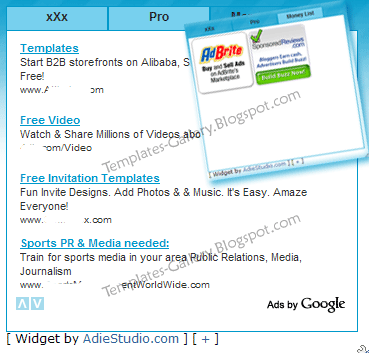
Wanna have this in your blog?
All you have to do is copy this script below then add to your page elements (Add HTML/Javascript)<style type="text/css">
div.TabTampil div.TTs
{height: 24px; overflow: hidden; }
div.TabTampil div.TTs a:hover, div.TabTampil div.TTs a.Active
{ background-color: #77d0ee; }
div.TabTampil div.Halamans
{ clear: both; border: 1px solid #0199cb; overflow: hidden; background-color: #ffffff;}
div.TabTampil div.Halamans div.Halaman
{ height: 100%; padding: 0px; overflow: hidden; }
div.TabTampil div.Halamans div.Halaman div.Alas
{ padding: 3px 5px; }
div.TabTampil div.TTs a
{ border-left:1px solid #0199cb; border-right:1px solid #0199cb; border-top:1px solid #0199cb; border-bottom:0px solid #0199cb; float: left;
display: block; width: 100px; text-align: center; height: 24px; padding-top: 3px; vertical-align: middle; text-decoration: none; font-family: "Arial", Serif;
font-size: 12px; font-weight: 900; color: #222}
</style>
<form action="tabtampil.html" method="get">
<div id="TabTampil" class="TabTampil">
<div style="width: 370px;" class="TTs"> <a>Tab 1 Name</a> <a>Tab 2 Name</a> <a>Tab 3 Name</a></div>
<div style="width: 350px; height: 300px;" class="Halamans">
<div class="Halaman">
<div class="Alas">
Tab 1 content goes here
Tab 1 content goes here
Tab 1 content goes here
</div>
</div>
<div class="Halaman">
<div class="Alas">
Your tab 2 content goes here
Your tab 2 content goes here
Your tab 2 content goes here
</div>
</div>
<div class="Halaman">
<div class="Alas">
Tab 3 content goes here
Tab 3 content goes here
Tab 3 content goes here
</div>
</div>
</div>
</div></form>
<script style="text/javascript" src="http://meichelina.googlepages.com/newscriptab.js"></script>
<script type="text/javascript">tabtampil_inisial('TabTampil');</script>
IICOLORSIIIIIIII ---> Edit to change colors
IIIIIICOLORSIIII ---> Edit to change the content/text
IIIIIIIIICOLORSI ---> Edit Size according to your sidebar width and height
If you have a problem when making multiple tab in blogspot, you can post your question below.
Making accordion tab in blogger, multiple tabs in blogspot, blogger tricks how to save you page size by using tab viewer.I move this article from my blog at templates-gallery.blogspot.com because this domain is really cool for me. he he he peace :)
more
